Email Flows
Abandoned Checkout Flow With Examples
An abandoned checkout flow is the automated email (and SMS) sequence that goes to shoppers who started checkout, gave you their contact info, and left before paying. Of everyone your recovery flows reach, they are the closest to buying, which is why this is usually the first recovery flow I build. Some tools, Klaviyo included, file it under the abandoned cart flow, so if that is the name you know, you are in the right place. Below I show how the two fit together.
In this guide
Abandoned Checkout Flow
Here’s how we run the Abandoned Checkout Flow at my agency, with examples we built for our client, CROSSNET.
For the full abandoned cart email sequence, timing, and mistakes that kill recovery, see the abandoned cart email guide.
Overview: Doing this will help recover and convert more of your most engaged visitors that you’re driving to your website. It’s a follow-up sequence sent to someone who has added items to their cart and gotten through a portion of the checkout and then left the site without purchasing.
Email 1: The reminder
Email 1: We send a simple, "come back, you forgot this" with a dynamic block of their abandoned items.
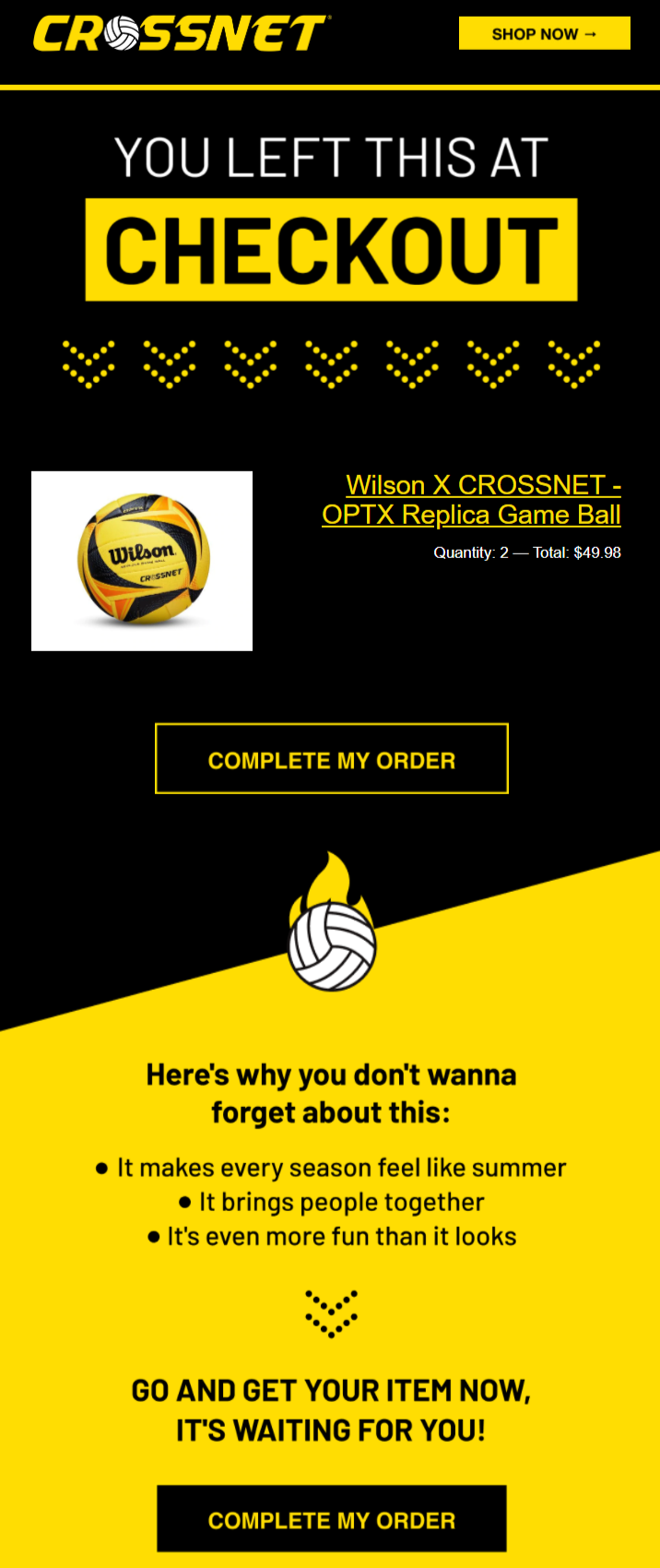
What makes it work: the headline says exactly what happened (“You left this at checkout”), and the dynamic block shows the real product, quantity, and total, so nobody has to remember what they picked. The button says “Complete my order,” which matches where the shopper is in the funnel. Below the fold, three short reasons to own the product (“It brings people together”) resell the feeling without any discount.
Email 2: The offer
Email 2: This email is where we get a tad more aggressive at trying to convert the customer. Here we'll offer a dynamic code for a discount and remind them of their items. (Bonus: include product testimonials to nudge them in the right direction).
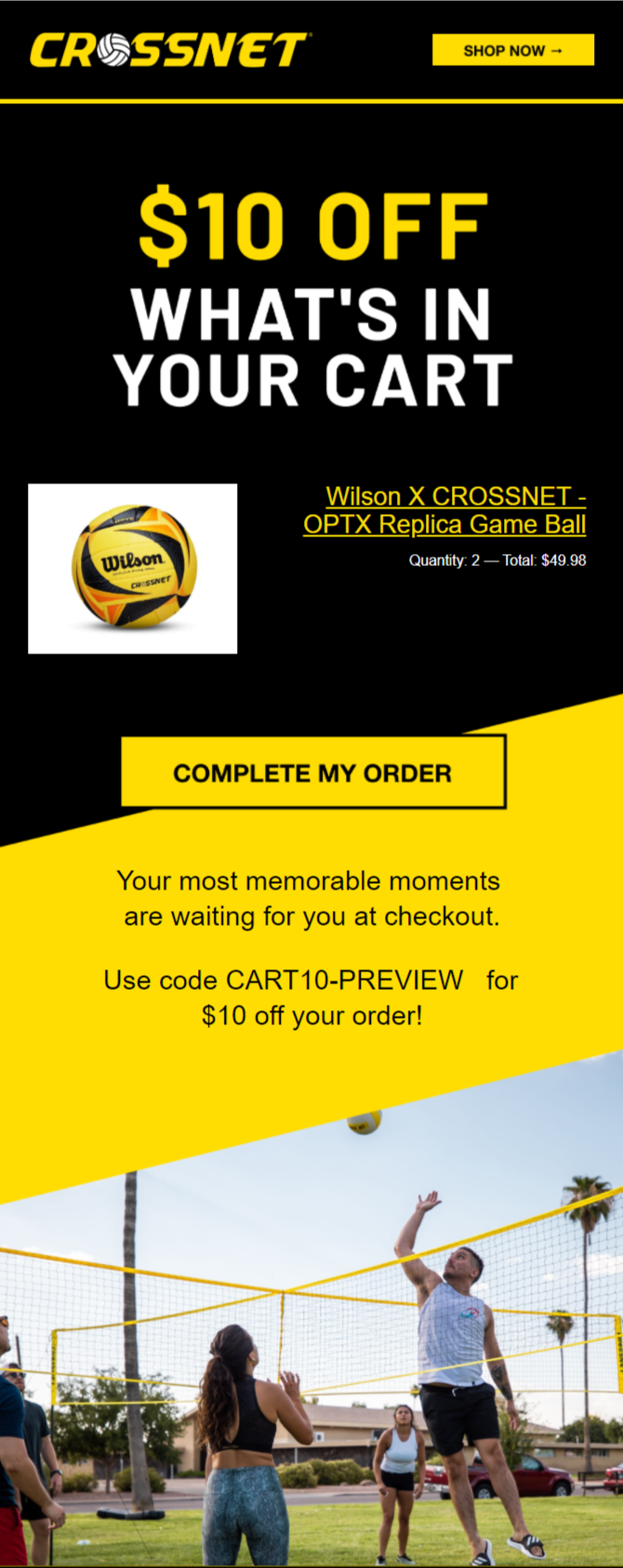
What makes it work: the offer is the headline, so the email does its job even if someone only glances at it. A fixed $10 off on a cart around $50 reads as a meaningful amount, and a dollar offer caps your cost on bigger carts in a way a percentage does not. The code in the screenshot is a preview placeholder; in the live flow each shopper gets a unique, single-use code from the dynamic coupon block. The lifestyle photo sells the moment people are buying the product for.
Email 3: The expiry
Email 3: We'll tell them their discount is expiring to strike that urgency and FOMO while the iron is hot, and we'll remind them of the items they left at checkout.
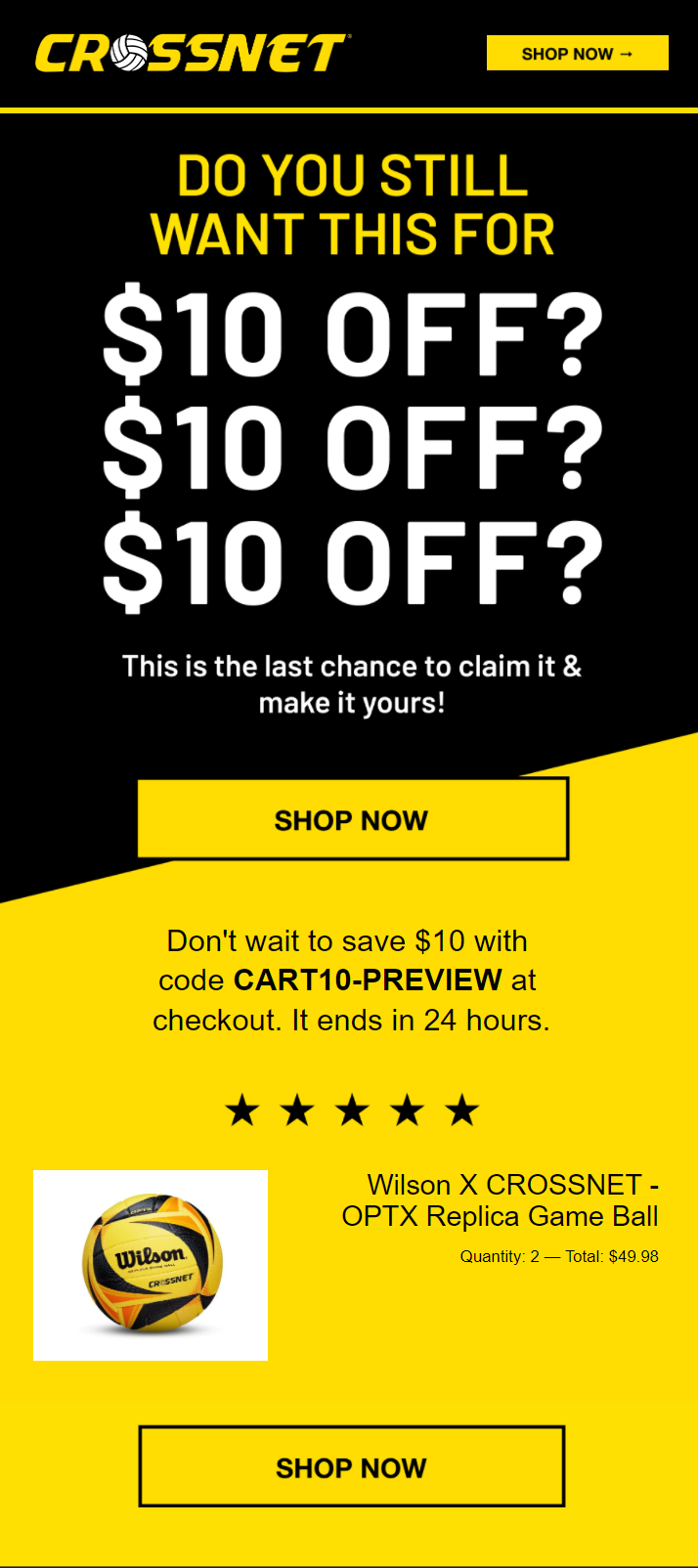
What makes it work: the deadline is specific (“It ends in 24 hours”) and true, which is the only kind of urgency worth sending. The cart block comes back one more time with a star rating for a bit of proof. If I were rebuilding it today, I would change the “Shop now” buttons back to “Complete my order” so the call to action matches email 1 and 2 and sends people straight to their checkout.
Why the discount sits in email 2 here: CROSSNET’s cart values and margins made an early offer worth testing. For many brands I push the first offer to email 3 or skip it. The discount section below covers how to decide.
Abandoned checkout flow vs abandoned cart flow vs browse abandonment
People mix these three flows up, and it costs them money. Each one fires at a different point in the funnel, reaches a different set of people, and needs a different message.
| Flow | Fires when | Who you can reach | What the email should do |
|---|---|---|---|
| Abandoned checkout | Shopper starts checkout, enters email or phone, leaves without paying | Anyone who typed their contact info at checkout, including people who were never on your list | Remove friction, link straight back to the filled checkout, answer the last objection |
| Abandoned cart | Shopper adds to cart but never starts checkout | Only shoppers your ESP can already identify (subscribers, past clickers) | Remind them what they picked, add proof, ease them toward checkout |
| Browse abandonment | Shopper views a product and leaves without adding to cart | Only identified subscribers | Light touch: show the product, related picks, help them decide |
Checkout sits at the top of the priority list. When someone moves from cart to checkout, they should leave the cart flow and enter this one, so nobody gets two reminders about the same order. If you are building an abandoned cart email flow from scratch, the full cart sequence lives in the abandoned cart email guide, browse has its own page at browse abandonment flow with examples, and the 3 abandoned email flows shows how all three fit together.
The abandoned checkout flow structure I recommend
The CROSSNET version above is a lean three-email build. For most brands I start with four emails over about 48 hours, which matches the spec in my 10 ecommerce email flows breakdown. Adjust for price point and margin.
Email 1: Reminder
1 to 2 hours after abandonment
Assume something went wrong: a declined card, a crashed page, a dead phone. No discount. Show the cart and give one button back to the filled checkout.
Email 2: Trust
About 12 hours
Reviews for the exact product, your guarantee, the return policy, and a real person to reply to. This is where the testimonial bonus from the CROSSNET flow fits.
Email 3: Objection or offer
About 24 hours
Answer the usual blocker for your category (price, shipping cost, fit, delivery time). Add an incentive here only if margin allows.
Email 4: Expiry
About 48 hours
A real deadline on the offer, or honest low-stock news if it is true. Then the shopper exits the flow.
Selling something under about $50 with thin margins? Run the lean three-email version. Selling something expensive or considered, like furniture or a big-ticket bundle? Keep all four and give email 3 to objection handling, financing, or a reply-to-a-human option before you ever reach for a code.
Filters that keep the flow clean
- Exit anyone who places an order, checked before every message.
- Pull checkout starters out of your cart and browse flows so the checkout flow is the only one talking to them.
- Limit re-entry (for example, once every 7 to 14 days) so a habitual abandoner does not get the same sequence every few days.
- Exclude draft orders, wholesale accounts, and internal test emails if your platform creates checkouts for them.
- Run one sender only. If your ESP runs the flow, turn off Shopify’s own abandoned checkout email.
Abandoned checkout email examples you can steal
Use these as starting points. Swap in your voice, your product, and your real policies. The subject lines are written to be tested against each other, so pick two per email and let the placed-order rate decide.
Email 1: The “something broke” reminder
Subject lines: “Oops, did something go wrong?” · “Still want your [product]?” · “You left this at checkout”
Preview text: “We saved your cart. Pick up right where you left off.”
- Headline that names the moment, the way CROSSNET did
- Dynamic cart block: image, name, variant, quantity, total
- One button: “Complete my order” linked to the saved checkout
- One line of help: “Card trouble? Reply to this email and we’ll sort it out.”
Keep the “did something go wrong” angle helpful. Never imply a payment failed unless it did.
Email 2: Trust and proof
Subject lines: “What [customers] say about [product]” · “Questions before you order?” · “The [product] people keep reordering”
- Two or three reviews for the exact product in the cart, with names if you have permission
- Guarantee and return policy in plain words
- Shipping cost and delivery window, stated up front
- A founder or support sign-off people can reply to
Email 3: Answer the objection (offer optional)
Subject lines: “Free shipping on your cart” · “A little something for your order” · “Not sure about sizing?”
- Lead with the objection your customer service team hears most
- If you offer something, make it the headline, the way CROSSNET’s “$10 off what’s in your cart” does
- Unique single-use code, applied automatically through the checkout link when your platform supports it
- Cart block again, then the same button
Email 4: The honest deadline
Subject lines: “Your code expires tonight” · “Last call on your cart” · “We can’t hold this much longer” (only if stock is limited)
- One sentence with the exact deadline
- Cart block and a star rating or one short review
- “Complete my order” button, then let them go
Want more creative to model? The abandoned cart email examples page has 15+ templates, and most of them adapt cleanly to checkout.
Discount strategy for abandoned checkout emails
Every discount you send in this flow goes to someone who was one click from paying full price. Some of them needed the nudge. Plenty of them did not. A few rules keep you on the right side of that math:
- Never in email 1. The first email recovers the people who got distracted or hit a technical problem. Paying them a discount is margin you did not need to spend.
- Pick the slot by margin and price. Healthy margins and a low cart value (like CROSSNET) can justify an offer in email 2. Thin margins or high cart values usually mean email 3 or 4, or no offer at all.
- Try free shipping first. In Baymard Institute’s research, extra costs like shipping, tax, and fees are the top reason shoppers abandon an order once you set aside people who were only browsing (Baymard). If shipping is the blocker, solving shipping can beat a percentage off.
- Dollar or percent? On lower-priced carts a fixed dollar amount often sounds bigger. On larger carts it protects your margin.
- Use unique, single-use codes with a real expiry. Shared codes leak onto coupon sites fast.
- Watch repeat abandoners. If someone received a discount from this flow in the last 30 to 60 days, send them the no-discount path.
Then test it. Split the flow at the offer email, send half the code and half a no-code version, and compare revenue per recipient after discount cost. That number tells you whether the offer is earning its keep.
Pairing SMS with your abandoned checkout flow
SMS works well here because checkout is often the moment shoppers type in their phone number. Klaviyo’s 2026 benchmarks (Klaviyo uses “abandoned cart” as the umbrella for cart and checkout flows) put average revenue per recipient at $6.77 for email and $4.48 for SMS, with SMS click rates higher than email (Klaviyo). Text and email do different jobs, so give each one its own role:
- Consent first. Only text people who opted in to SMS marketing. A phone number entered for shipping updates is not permission to market.
- Text 1, within the first hour or two: one or two lines and the checkout link. “Hey, it’s [brand]. Your cart is saved here: [link]. Reply if you hit a snag.”
- Text 2, before an offer expires: only if there is an offer, and only once.
- Stagger the channels. If email 1 goes at the 1-hour mark, send the text around 30 minutes or hold it until after email 2. Two messages in the same minute feels like a pile-on.
- Respect quiet hours in the shopper’s time zone, and stop both channels the moment they buy.
Setup notes: Shopify, Omnisend, and Klaviyo
Whichever tool you use, the setup comes down to the same three pieces: trigger on started checkout, exit on placed order, and make sure only one tool is sending. Platform menus change, so double-check against each help center before you go live.
Shopify (native)
- Shopify counts a checkout as abandoned once the shopper has entered their email and the checkout stays incomplete for more than ten minutes (Shopify Help Center).
- The automation lives in the Shopify Messaging app as Recover abandoned checkout. By default it sends only to customers subscribed to email marketing; you can change the recipients to all customers in the email editor.
- It is a fine starting point for a new store. Once you want multiple emails, dynamic offers, and SMS logic, most brands move the flow to a dedicated ESP. More on that call in my Shopify email marketing guide.
- When you move the flow to an ESP, turn off Shopify’s version so customers do not get two reminders.
Omnisend
- Omnisend has separate Abandoned Cart and Abandoned Checkout presets. Abandoned Checkout triggers on Started Checkout and exits on Placed Order (Omnisend Help Center).
- When a contact moves from cart to checkout, they leave the Abandoned Cart workflow and enter Abandoned Checkout, so running both does not double up.
- If you also run browse, product, or search abandonment, use the Skip Contacts settings so checkout stays the top priority.
- Email and SMS can live in the same workflow, which makes the staggered text-plus-email setup above easy to build. Full disclosure: I partner with Omnisend and may earn a commission through that link, so I am a little partial.
Klaviyo
- For Shopify stores, Klaviyo’s default abandoned cart flow is triggered by the Checkout Started metric, which tracks once a shopper fills in the email field at checkout (Klaviyo Help Center).
- Add the flow filter Placed Order zero times since starting this flow so buyers exit.
- Klaviyo recommends running a separate Added to Cart flow too. If you do, exclude anyone who started checkout from it so the checkout flow owns them.
- If you use Shopify draft orders, add a trigger filter. Draft orders can fire a started checkout event without a matching placed order.
- Klaviyo is deep and capable here. If your team already lives in it, build there and spend your energy on creative and testing.
Metrics to watch
Open rates are too noisy to judge this flow. Watch the numbers tied to orders:
- Revenue per recipient (RPR) for the whole flow and for each message. This is the cleanest way to compare versions.
- Placed order rate by email, so you know which step does the heavy lifting.
- Recovery rate: recovered orders divided by abandoned checkouts that entered the flow.
- Click rate as an early read on subject lines and creative.
- Discount cost per recovered order, if you use offers.
- Unsubscribes and spam complaints, especially after the offer and expiry emails.
For context, Omnisend’s 2026 report found automated emails were 2% of email sends but drove 30% of email revenue in 2025, earning $2.87 per send versus $0.18 for scheduled campaigns (Omnisend). Email typically drives 25-40% of an ecommerce brand’s revenue, and recovery flows like this one are a big part of that. If you want to see where this flow sits in the full program, start with ecommerce email marketing.
Common abandoned checkout mistakes
- Two tools sending at once. Shopify’s native email plus your ESP flow means two reminders for one order. Pick one.
- Discounting in email 1. You pay margin to people who were already buying.
- A link to the homepage or an empty cart. Test the checkout link on mobile with a real abandoned checkout before launch.
- Cart and checkout flows both firing. Without exclusions, the same shopper gets both sequences.
- Fake urgency. Countdown timers that reset and “only 2 left” when there are 2,000 erode trust fast.
- Generic placeholder products. If the dynamic block is broken, the email reads like spam. Check that images, variants, and totals pull through.
- Set it and forget it. Offers, products, and policies change. Review the flow at least once a quarter.
Frequently asked questions
What is an abandoned checkout flow?
An abandoned checkout flow is an automated series of emails (and texts, if the shopper opted in) sent to someone who started checkout, entered their email or phone, and left without placing the order. It shows the exact items, links back to the saved checkout, and stops the moment they buy.
What is the difference between abandoned checkout and abandoned cart?
Abandoned cart fires when a shopper adds a product to the cart but never starts checkout. Abandoned checkout fires after they start checkout and give contact details, then leave before paying. Checkout abandoners are further along and easier to reach, so the checkout flow usually earns more per recipient and should take priority over the cart flow.
How many emails should an abandoned checkout flow have?
Three or four emails over about 48 hours works for most ecommerce brands: a reminder at 1 to 2 hours, trust and proof at about 12 hours, an objection or offer email at about 24 hours, and a final expiry email at about 48 hours. Lean three-email versions work well for lower-priced products.
When should the first abandoned checkout email go out?
Send the first abandoned checkout email 1 to 2 hours after the shopper leaves. That is soon enough to catch someone who got distracted or hit a payment problem, and late enough that it does not feel like you are watching them. Test 30 minutes versus 2 hours if you have the volume.
Should abandoned checkout emails include a discount?
Keep the first email discount-free, because many checkout abandoners were going to buy anyway. If margin allows, introduce an offer in email 2 or 3, use unique single-use codes, give the offer a real expiry, and skip the discount for people who received one from this flow recently.
Should I send SMS in an abandoned checkout flow?
Yes, if the shopper explicitly opted in to SMS marketing. One short text with a direct checkout link within the first hour or two, plus one text before an offer expires, is plenty. Respect quiet hours and make sure the text and email do not say the same thing at the same moment.
How do I set up an abandoned checkout flow in Shopify, Omnisend, or Klaviyo?
In Shopify, use the Recover abandoned checkout automation in the Shopify Messaging app. In Omnisend, turn on the Abandoned Checkout preset, which triggers on Started Checkout and exits on Placed Order. In Klaviyo, build a flow triggered by Checkout Started (Shopify) with a Placed Order zero times since starting this flow filter. Run only one tool's checkout flow so shoppers do not get duplicate reminders.
P.S. I cover a bunch of other flows, campaigns, best practices, and more in my Ecommerce Email Marketing Course.
Next step
Get more flows like this in your inbox
My newsletter is where I share practical email marketing breakdowns like this one: real flows, real campaigns, and what I would change. If this page helped, you will like the newsletter.
Join the newsletter →