The Best Post-Purchase Email Sequence for Shopify Brands After BFCM
By Chase Dimond. Last updated: October 30, 2026.
The best post-purchase sequence after BFCM is seven emails, timed from delivery instead of checkout: a thank-you with no offer, a product education email on delivery day, a check-in, a review ask after the customer has used the product, a gift follow-up before December 25, a Q5 help email from late December, and a second-order email timed to the product's reorder cycle. Split it by buyer type. Gift buyers, discount hunters, and full-price buyers each need a different path.
Your list just grew more in a week than it did all quarter. The hard part starts now. Most of them bought once, on a discount. Give them a reason to remember you by January. This page is the sequence I'd build this week, plus a scorecard so you can grade the flow you already have.
If you want the year-round version, read my guide to the post-purchase email flow. This page covers the BFCM window only: Cyber Week through mid-January.
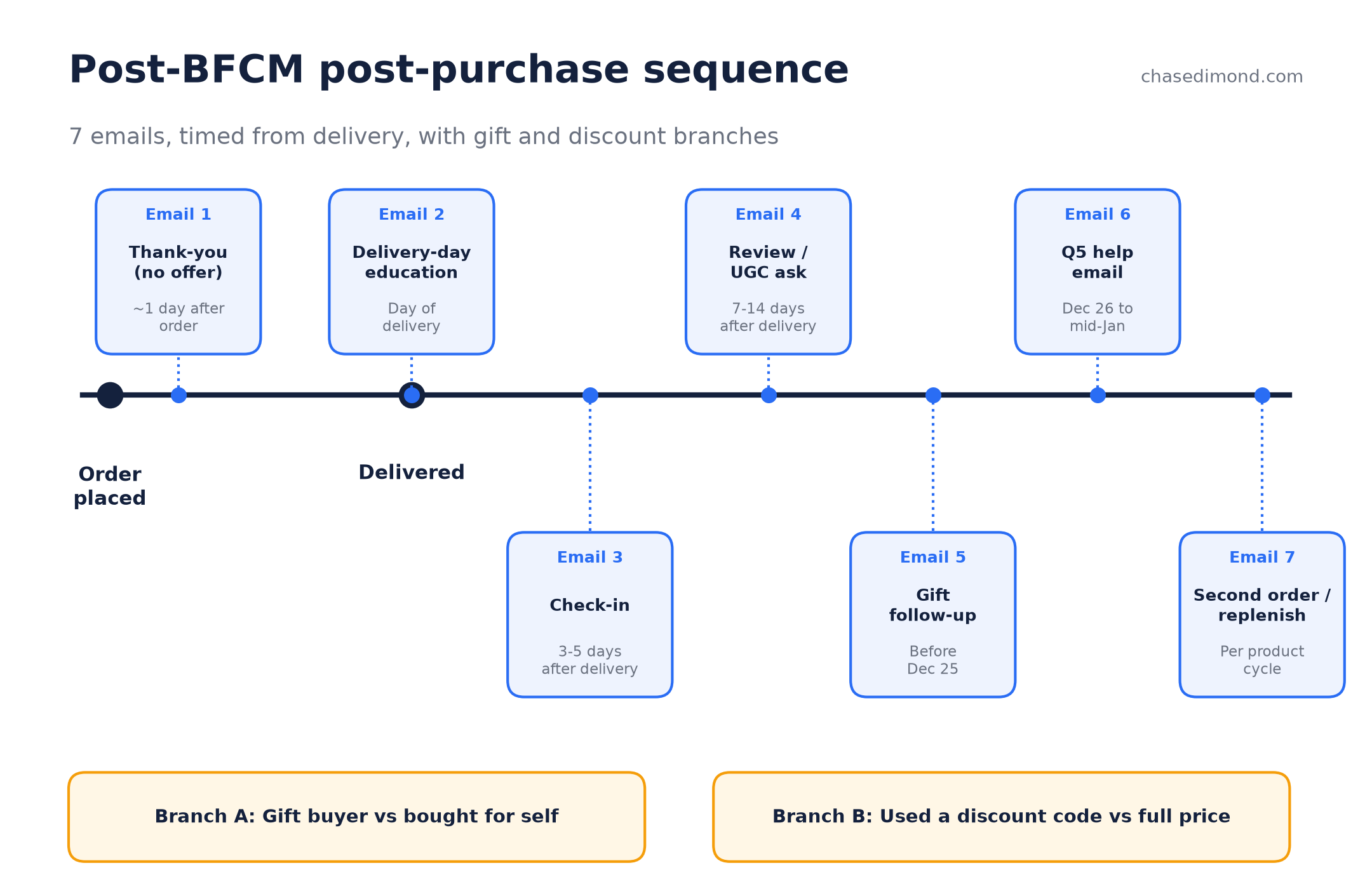
Quick answer: the 7-email post-BFCM sequence
A post-purchase sequence is the set of automated emails a customer gets after they order. After BFCM, it has one job: turn a first order into a second one without training people to wait for the next sale.
| Timing (from delivery) | Who gets it | Goal | What to avoid | Built in | |
|---|---|---|---|---|---|
| 1. Thank-you | About 1 day after order (before delivery) | All BFCM buyers | Confirm, set expectations, show the human behind the brand | Any discount or cross-sell | Omnisend automation (Shopify order confirmation stays transactional) |
| 2. Delivery-day education | Day of delivery | Self-purchasers | Help them use the product right the first time | Generic brand story with no product detail | Omnisend automation triggered on Shopify fulfillment or delivery event |
| 3. Check-in | 3 to 5 days after delivery | Self-purchasers | Catch problems early, answer questions, offer support | A review ask in the same email | Omnisend automation |
| 4. Review or UGC ask | 7 to 14 days after delivery, adjusted to how long the product takes to show results | Self-purchasers with no support ticket open | Collect reviews and photos for January traffic | Asking before the product has arrived | Omnisend automation or your reviews app |
| 5. Gift follow-up | Before December 25 | Gift buyers | Gift receipts, exchange info, wrapping or note tips, a recipient-friendly how-to | Education written for the person who uses it | Omnisend automation filtered on the gift field |
| 6. Q5 help email | December 26 to mid-January | Gift buyers and recipients you captured, plus self-purchasers | Exchanges, setup help, gift card spending, the right next product | A sitewide sale blast to everyone | Omnisend campaign to a BFCM segment |
| 7. Second order or replenishment | Timed to the product's reorder or usage cycle | Everyone who hasn't bought again | Earn order number two | One fixed delay for every product | Omnisend automation with per-category delays |
Two terms you'll see below. Q5 is the stretch between December 26 and mid-January, when gift cards get spent, returns happen, and ad costs drop. Suppression means excluding people from campaigns while they're inside a flow, so they don't get a 30%-off blast two days after paying full price.
Why BFCM buyers need a different sequence
Your normal post-purchase flow assumes a normal customer. BFCM brings in a different crowd. More of them are first-timers, more used a code, and a big share bought for someone else. Shopify's enterprise team puts it plainly: most customers acquired during BFCM have a lower lifetime value, so they need a dedicated retention sequence (Shopify Enterprise).
So the sequence has to branch. Three splits matter most.
Discount hunters vs full-price buyers
Branch on whether a discount code was used. Someone who paid full price during Black Friday really wanted the product. Give them more of the brand: how it's made, how to get the most from it, what pairs well with it. Someone who came in on 40% off needs proof the product is worth full price. Lead with education and reviews. Don't send them another code in week one, or you've taught them your real price is the sale price.
Gift buyers vs self-purchasers
Ask "Is this a gift?" at checkout or in the thank-you email, and split the path. A gift buyer doesn't need a guide to using a product they'll never touch. They need to know it'll arrive on time, how exchanges work, and how to include a gift receipt. The recipient is the person who needs the education, and you don't have their email yet. That's what email 5 and the thank-you page popup are for.
Shipping delays and the "where is my order" window
Carriers are slammed in December. If your delays count from checkout, a "How's it going?" email can land before the box does. That reads as careless. Trigger from delivery when your Shopify store passes a delivery event, and fall back to fulfillment plus your average transit time when it doesn't. The thank-you email is the one exception. It goes out right after the order because its job is to reassure them that the order is in.
The sequence, email by email
1. Thank-you (no offer)
When: about a day after the order. CTA: follow on social or reply with a question.
Keep it short. Thank them, tell them when to expect the package, and let a real person sign it. If you're a founder-led brand, this is where the founder shows up. No cross-sell. They just gave you money.
Subject lines to test:
- Your order is in. Here's what happens next
- Thank you (from a real person)
- We're packing your order now
2. Delivery-day education
When: the day it's delivered. CTA: read or watch the how-to.
This is the most underrated email in the flow. Show them how to get the result they bought the product for. Use product-specific content: the first three steps, the common mistake, the one tip that makes it work better. Write it for your top sellers first and use a category version for the rest. I break down what to put in these in my guide to post-purchase education emails.
- It's here. Start with this
- The 2-minute guide to your new [product]
- Most people miss this step
3. Check-in
When: 3 to 5 days after delivery. CTA: hit reply.
Plain text. One question: "How's it going so far?" It catches problems before they turn into one-star reviews. Route replies to your support inbox, and keep anyone with an open ticket out of the review ask.
- Quick question about your order
- Everything working okay?
4. Review or UGC ask
When: 7 to 14 days after delivery, longer for products that take weeks to show results. CTA: leave a review or post a photo.
Reviews collected now sell to January shoppers. Ask once they've used the product. A skincare brand should wait longer than a phone case brand. Make it one click, and ask for a photo if your product looks good in real life.
- Would you do us a quick favor?
- How would you rate your [product]?
- Show us how you're using it
5. Gift follow-up
When: before December 25, ideally once the package is delivered. CTA: grab the gift receipt or exchange info.
Tell gift buyers how exchanges work, how long they have, and give them a printable gift note or a link the recipient can use for setup help. That link is your way to reach the recipient, who's a new potential customer.
- Everything you need to give it as a gift
- Gift receipt and easy exchanges inside
6. Q5 help email
When: December 26 to mid-January. CTA: depends on the segment.
Gift card holders get "here's what to spend it on." Recipients you captured get setup help and a welcome. Self-purchasers get the natural next product. Send it to a BFCM segment, never as a blast to the whole list. Discount-led versions belong only to people who've shown no interest after a few weeks.
- Got a gift card? Here's where to start
- New year, here's what goes with your [product]
7. Second order or replenishment
When: timed to how long the product lasts or how fast customers usually come back. CTA: reorder or shop the pairing.
A replenishment email reminds people to rebuy something they've used up. Set the delay per category. A 30-day supply gets a reminder around day 25. Apparel gets a "complete the look" email based on what they bought. If they still haven't come back after their window, that's when an offer earns its place.
- Running low?
- Your next one is ready when you are
- This goes with what you bought
Best sequence for each type of Shopify brand
Best for consumables: replenishment-led
Coffee, supplements, skincare, pet food. Keep emails 1 to 4 short, and put most of your effort into email 7. Time the reminder to the supply size, and offer a subscription in the replenishment email instead of a discount. For consumables, the second order is what matters most, and it's predictable, so build around it.
Best for apparel: fit, exchange, and styling
Clothing and shoes. Make email 2 about fit and care, and make exchanges easy before anyone asks. A painless exchange keeps a customer you'd lose to a refund. The second-order email works best as styling: three things that go with what they bought, using real product data from Shopify.
Best for giftable and one-time products: referral and recipient capture
Jewelry, home decor, gadgets, anything people mostly buy for someone else. The buyer may never need a second one, so your growth comes from the recipient and the buyer's next gift. Lean hard on email 5 and email 6. Use an Alia popup on the thank-you page or the gift setup page to capture the recipient's email, then send them a welcome series of their own. Add a referral ask to email 6.
Scorecard: grade your post-BFCM flow
Open your current flow and score each row. 0 means missing, 1 means partial, 2 means done. The max is 20. Do it before December 1 so you have time to fix the gaps.
| Criterion | 0 | 1 | 2 | Evidence to check |
|---|---|---|---|---|
| Timing counted from delivery | From checkout | Mixed | Delivery events | Flow trigger settings |
| BFCM buyers segmented | No | Tag only | Own branch | Segment definition |
| Gift vs self split | No | Asks, no branch | Separate path | Checkout question + flow |
| Discount-hunter branch | No | Same content | Value-first branch | Discount code filter |
| No offer in first 2 emails | Offer | Soft | None | Email copy |
| Education on delivery | None | Generic | Product-specific | Email content |
| Review ask after use | Before delivery | Fixed day | Delivery + use window | Trigger |
| Q5 email exists | No | Sitewide sale | Segment-specific help | Campaign calendar |
| Second order timed to product cycle | None | Fixed | Per category | Flow delays |
| Campaign suppression while in-flow | No | Partial | Yes | Exclusion rules |
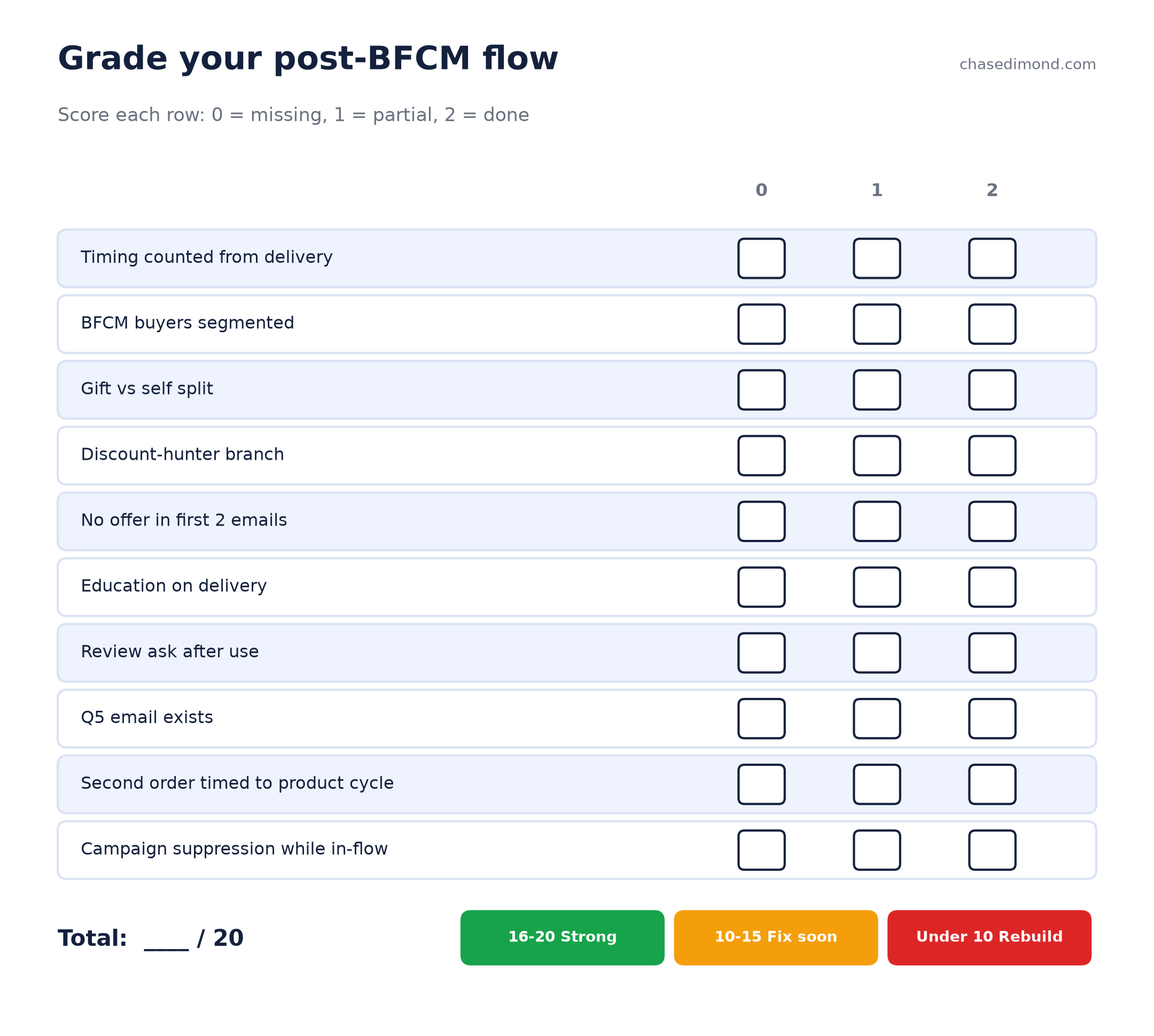
How to read your score:
- 16 to 20: you're in good shape. Tune subject lines and timing.
- 10 to 15: the flow works but treats every buyer the same. Add the gift and discount branches first.
- Under 10: you're running a generic flow. Fix timing and suppression this week, since those two cost you the most.
How to build it in Omnisend on Shopify
Steps checked against Omnisend's Help Center on October 31, 2026. Omnisend updates its interface, so confirm labels in your account.
Omnisend is the platform I recommend for Shopify brands, and everything above builds there without custom code.
- Connect Shopify. Orders, fulfillment status, and order data like discounts sync into Omnisend automatically.
- Start from the order follow-up automation. Its default trigger is Placed Order with an "Order status is paid" filter (Omnisend Help Center). Add trigger filters for your BFCM date window if you want this flow to run only for sale buyers.
- Add Conditional Splits. A split sends contacts down a Yes or No path based on trigger filters (order data at the moment of purchase), contact properties, or message engagement (Omnisend Help Center). Use one for discount used vs full price, and one for gift vs self. Splits only see order data that existed when the order came in, so capture the gift answer at checkout, as an order note or tag, before the order is placed.
- Time from delivery. Omnisend's Order Fulfilled trigger fires when the order ships. Omnisend has no native Delivered event, so if you want true delivery timing, connect a tracking app with a direct Omnisend integration (AfterShip, TrackShip, or 17TRACK) and each shipping status becomes its own trigger (Omnisend Help Center). Without one, start the education emails off Order Fulfilled plus your average transit time.
- Add exit conditions. In the workflow editor, click the Trigger block and open Exit conditions. Add Order Placed so the second-order email stops once they buy again (Omnisend Help Center). Exit conditions only apply to contacts who enter after you set them, so add them before BFCM orders start.
- Suppress in-flow buyers from promos. Build a segment of recent BFCM buyers and use the exclude segments option on your campaigns. When a contact is in both an included and an excluded segment, exclusion wins (Omnisend Help Center).
For the rest of the flows a Shopify store should run, see my ecommerce email flows guide and the Shopify email marketing playbook.
Mistakes I see after BFCM
My agency helped 250+ ecommerce brands generate $200M, and I see the same mistakes every January.
- A discount on day 1. They just bought. Another code tells them they overpaid and trains them to wait.
- A review ask before delivery. It happens whenever delays count from checkout during the slowest shipping weeks of the year.
- Blasting in-flow buyers. A new customer gets your education email and a "last chance, 30% off" campaign on the same day. Suppress them.
- Ignoring the gift recipient. The person who actually uses the product is often the best new customer you got all season, and most brands never get their email.
- One delay for every product. A 60-day supply and a 14-day supply shouldn't get the same reorder email on the same day.
How to measure your own lift: pull everyone who placed a first order during BFCM this year and last year. For each group, check what share placed a second order within 60 and 90 days. Run the new sequence, then compare this year's group to last year's at the same checkpoints. That number, from your own store, tells you whether the flow is working.
Want to see what brands sent during the sale itself? Browse these Black Friday email examples, my BFCM email guide, and these customer retention email examples.
FAQ
What post-purchase emails should a Shopify brand send after BFCM?
Send a thank-you with no offer a day after the order, a product education email on delivery, a check-in a few days later, a review or UGC ask once the customer has used the product, a gift-buyer follow-up before December 25, a Q5 help email from late December, and a second-order email timed to the product's natural reorder cycle. Count every delay from delivery.
How is a post-BFCM sequence different from a normal post-purchase flow?
It branches by buyer type. BFCM brings in gift buyers and discount-driven first-timers, so the sequence splits gift from self purchases, leads with value instead of another discount, and suppresses in-flow buyers from promo blasts.
Should you send a discount after Black Friday?
Lead with education, reviews, and the right next product first. Save an offer for buyers who show no second-purchase intent after their product's normal reorder window.
How do you handle gift purchases in post-purchase emails?
Ask whether the order is a gift, then send gift buyers a separate path with delivery timing, gift receipts, and exchange info before December 25. Capture the recipient's email with a thank-you page popup or a setup link, and send the recipient their own welcome emails.
When should the second-order email go out after BFCM?
Time it to the product's reorder or usage cycle, set per category. Consumables get a reminder shortly before the supply runs out. Apparel and one-time products get a pairing or styling email after the customer has had time to use what they bought.
How do I know if my current post-purchase flow is good enough?
Score it on the 10 criteria in the scorecard above, 0 to 2 each, for a max of 20. Under 10 means fix delivery-based timing and campaign suppression first.
Want help building this? See how to work with me.