Why Clients Keep Printing Your PDF, and How a Fillable Form Stops It
Every office has one. A PDF that goes out to clients looking exactly like a form, with boxes, lines and a spot for a signature, and it still can't take a single keystroke. The client prints it. They fill it in with whatever pen is nearby, snap a photo on the kitchen counter, and send it back with the bottom inch missing. Then somebody at the front desk types it all in again, squinting.
None of that needs a brand-new document. A PDF editor like pdfFiller, used by 64 million people worldwide, can convert a PDF to an editable form by laying typed fields over the existing layout. The page looks the same. The person on the other end clicks a box and types, and nobody has to guess whether "Apt #" was ever meant to fit on that tiny line.
A flat PDF only looks like a form.
Open one and try clicking the "Name" line. Nothing happens, because as far as the file is concerned, that line is a drawing. It could be a scan off the office copier or an export from Word. Same result either way: text and shapes, zero fields.
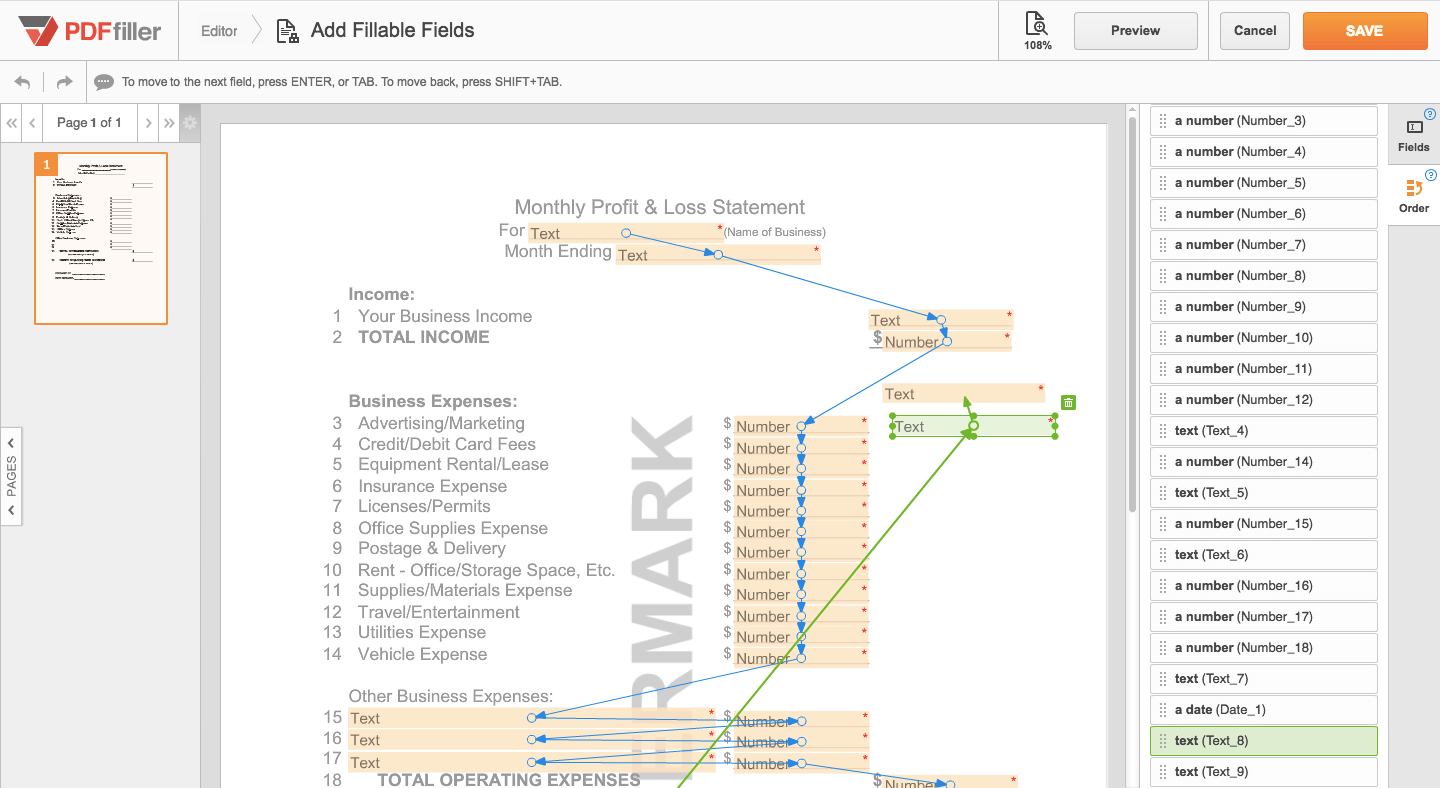
A fillable form adds a second layer. Every field has a spot on the page, a size and a type, so a name box takes text, a yes/no box takes a check mark, a date field takes a date, and a signature field takes an eSignature. It also means someone can tab through the answers in order, which people rarely think about until the cursor jumps from line 2 straight to line 9.
The printed design underneath doesn't move.
The conversion is four steps, and one of them takes most of the time.
pdfFiller runs in a browser, and there are iOS and Android apps for when the job happens on a phone. The order goes like this:
Upload the PDF, whether it’s a Word export, a downloaded government form, or a scan.
Run OCR if it came off a scanner, since a scanned page is really an image.
Drop fields wherever an answer should go, and set each one's type (text, checkbox, date, signature).
Save it as a form template, publish it, or send it for signature.
Step 3 eats the clock, especially on a long lease where nearly every line needs its own field. Get the placement right once, and you won't have to nudge boxes a millimeter to the left every time you send the form out.
Old scans need OCR first, or the fields sit on a blurry picture.
That intake sheet somebody scanned years ago? It's probably been printed, re-scanned and forwarded so many times the fine print has turned to mush.
pdfFiller's OCR reads the scan and turns it into editable text. Two things get easier after that. You can fix the stale bits, like the old suite number in the footer or a fax line nobody has checked in years, before the form goes anywhere. And fields line up against actual text rather than a fuzzy image. Honestly, if the scan is crooked or low resolution, rescanning the paper flat beats trying to rescue the bad copy.
Leases and disclosure packets in real estate
A leasing office sends the same lease, disclosures, and rental application to a steady stream of applicants. Set up as a form template, the property address and rent terms are typed in once, and the tenant only fills in their own fields. No more copies coming back with page 3 blank because the printer went double-sided and nobody flipped it over. Purchase agreements pass through more people and more edits, so there the audit trail- the log of who opened and signed what and when- ends up doing real work.
Intake and consent forms at a clinic
Intake packets are long. Patients fill them out on a clipboard in the waiting room, and staff spend part of the afternoon decoding handwritten medication lists. A fillable version can be completed on a phone or tablet before the appointment even starts.
Health data changes the rules a bit, though. pdfFiller supports HIPAA compliance and offers a signed Business Associate Agreement (BAA) on specific plans, and practices that run patient forms through it do so with that BAA signed and in place.
The first-week stack in HR onboarding
Offer letter. W-4. I-9. The handbook acknowledgment, and often a direct deposit form on top of that. Sent as a set of fillable forms before day one, the whole packet comes back typed, so HR reads answers at a glance instead of zooming into a phone photo of a clipboard. The acknowledgment page is the one that tends to go missing, oddly enough. It's a single signature on a single sheet, and nobody chases it until someone goes looking for it months later.
LinkToFill works for strangers; Send for Signature works for one person.
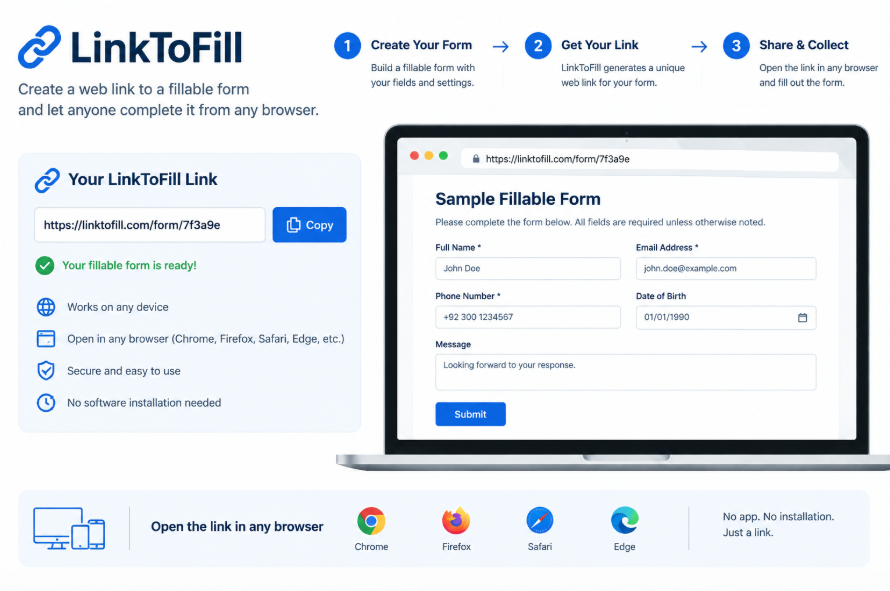
You can send the finished form in two ways. LinkToFill turns the document into a public web link that collects data and signatures, which suits cases where the recipients aren't known ahead of time: a rental application posted with a listing, a volunteer sign-up, a waiver handed out at an event. Send for signature is the narrower route: one client, one engagement letter, one signature.
On the legal question, electronic signatures are legally recognized in the U.S. under the ESIGN Act and UETA, and pdfFiller's eSignatures support those laws, plus eIDAS and GDPR. They're certificate-based, with an audit trail behind each one.
What protects the data once the form starts collecting it
A converted form may hold Social Security numbers, medical histories, and sometimes bank details. So where does it all live?
Documents are encrypted with 256-bit AES in transit and at rest, on infrastructure hosted in SOC 2 Type II-certified data centers with 24/7 threat detection. pdfFiller is independently certified for SOC 2 Type II and covers HIPAA, GDPR, CCPA, PCI DSS and FERPA compliance. The account and document controls include:
an Audit Trail logging who viewed, edited, signed or shared it, with timestamps and IP addresses
password protection per document
two-factor authentication
extra signer authentication, and expiry dates on anything sent out
Files stay in the user's private account. Not shared with third parties, not used to train AI models.
Show image: the audit trail logging views, edits and signatures on a sample document.
Most bad fillable forms fail on field size.
A street address crammed into a box meant for a ZIP code. That's the classic one, and it gets cut off every single time. Next up is a plain-text field sitting where a date should be, which is how one form ends up with "3/4", "March 4th", and "04-03" from three different people. Then there are forms with so many mandatory questions that people give up halfway through. Before sending anything, fill in every field yourself as if you were the recipient, long answers too. Five minutes. It'll catch most of it before a client does.
Frequently Asked Questions
Can you make a scanned PDF fillable?
Yes, with one extra step. A scan is stored as an image, so pdfFiller runs OCR to turn it into editable text first, then adds the fields on top. The cleaner the scan, the better this works. A flat, straight copier scan beats a phone photo taken at an angle on a desk.
Are eSignatures on a fillable form legal in the U.S.?
Electronic signatures are legally recognized in the U.S. under the ESIGN Act and UETA. pdfFiller's eSignatures support these laws, as well as eIDAS and GDPR. Each one is certificate-based and tied to an audit trail that records who signed, when, and from which IP address.
What's the easiest way to send one form to lots of people?
LinkToFill. It turns the document into a public web link that collects data and signatures, so a single form can sit on a website or go out in one group email. It works best for applications, sign-up sheets and waivers, where nobody knows in advance exactly who'll be filling it in.
Can I fill and sign a PDF on my phone?
Yes. Besides the web app, pdfFiller has iOS and Android apps so you can complete, sign, and send a fillable form from a phone or tablet. That's handy for anyone working away from a desk, whether it's an inspector on a job site, an adjuster at a damaged property or an agent showing a rental.
Is there a ready-made version before I convert my own?
Often, yes. pdfFiller has a library of over 100,000 forms and form templates, including state-specific legal and business forms. Starting with one of those and adjusting a few fields can take less time than creating a document from scratch, especially for common business paperwork.